Slow progression
|
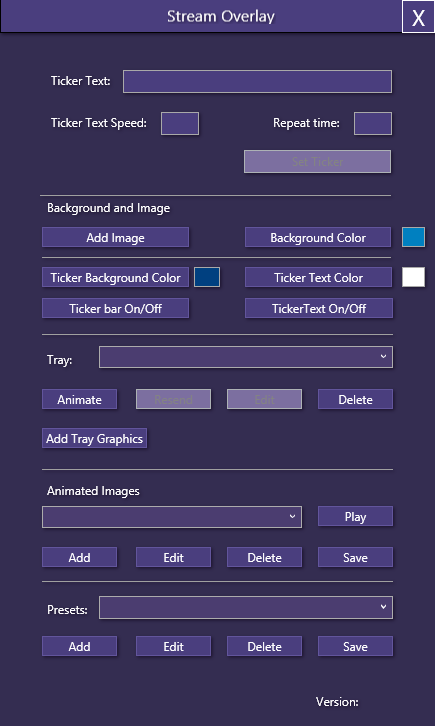
The last couple of weeks have been slow when it comes to development. There’s a lot of reasons for that, but mainly because there’s been a lot of personal stuff going on. Meetings and stuff like that. Also it’s been a couple of weeks where MVVM has shown itself from its “worst” side. The reason why I say “worst” side is that a lot of the things I want to accomplish is not as easy as the boilerplate approach. But since I want to learn, doing things the usual way is easy, doing it a different way is often more enlightening. One example of that is that I wanted to change the background color of the application during run-time. To illustrate this, the normal UI looks like this:
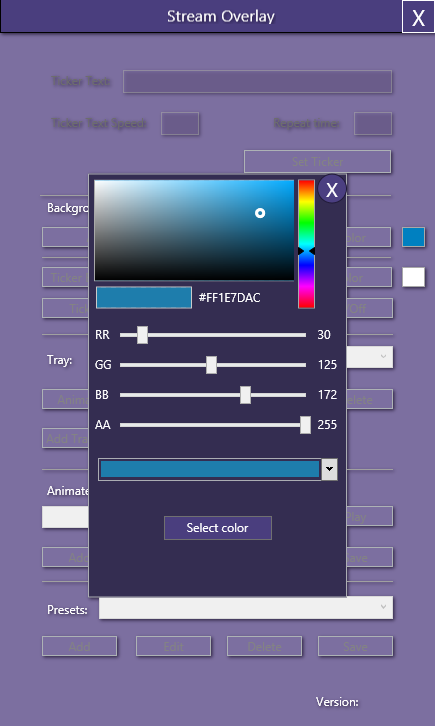
Since I want to have a different look on the background to illustrate further that it is disabled while another window is on top. I wanted to change the background color. To accomplish this, I needed to do more than just have a System.Media.Color type as a property. I used: Instead of using the Background=”{Binding MainWindowVM.CurrentWindowColor}”. The reason why this is done I’m not sure of yet, but from my understanding, a SolidColorBrush is the type that is needed. Since the property returned is a Color type the types seemed to be mismatched somehow. It would probably be easier to use SolidColorBrush as a property type instead of System.Media.Color. At the time however I did not know it was a Class I could use, but I have since learned that Most of the XAML “codes” are classes that you can use. Anyway, what I wanted to do was to accomplish this:
This will hopefully make it easier for the user to see what is the active parts of the program. The header is still in the normal color, at first it was not intentional, but since you can still move the window around I found out that it was better that it was like that. This way the user knows that it is not disabled, like the rest of the controls are. The same happens when other popup windows are open. It’s a small step on a road that has been much longer than anticipated. Further progressIn the next phase, depending on what the future brings, I hope to get the new UI setup as I want it to be. It goes a lot faster to accomplish the tasks, but there are some tasks that take longer than anticipated, because there are unforseen problems that occur. One of those has been the tray combobox that is a bit unpredictable. It doesn’t update as I hoped it would. For instance if an element is updated, the combobox is not updated to reflect that change. But for the most part, once I figure out the combobox and how it updates, it should be fairly easy. The wise choice would be to move on to other tasks, but that would mean this issue would be dangling over me. There is a workaround however, I could use a selectedIndex and get the ID number from that and get access to the ObservableCollection from that, but it’s not as elegant. But hopefully by the next update I will have solved the issue and moved on. But it depends on the future, since I’m awaiting to hear from a company that might want to hire me to create software for them. |