WPF. Sound run-time loading Unity
|
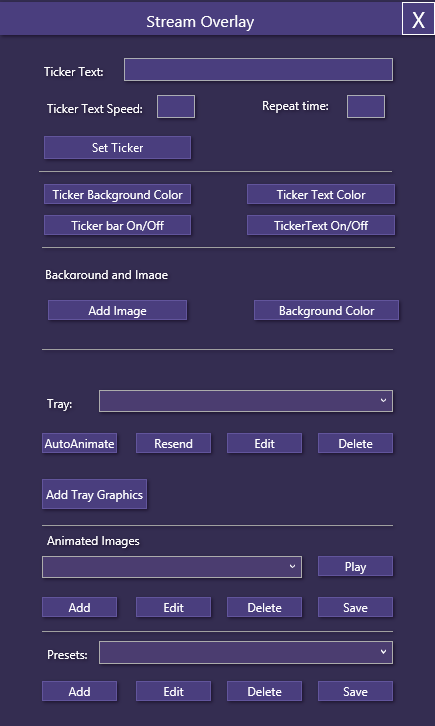
A little more than a week has gone by and more programming has been done. This time I was requested to put sound into Unity. Sound in Unity is normally not a problem. It’s just a matter of saying “Hey Unity, I have this AudioClip, drag it onto the AudioSource and you’re done. What I didn’t account for was when the user wants to load a custom clip, that you need to load it into memory first. All of a sudden it’s not as easy as with images. There are loads of codecs and some support streaming, others do not. Loading sounds during run-timeThe solution to loading sounds during run-time was to use the WWW class that exists in Unity. Basically what you do is use: Since this was part of the animation that I did I just expanded the class and it seemed to work. I did get some complaints, so I need to look into why that is and how I can fix it. Locally however it works flawlessly. This however only worked for .ogg files. Loading .wav I have not tested. WPF – Windows Presentation FoundationThe second thing I wanted to discuss, and this is actually the biggest topic is the WPF. At first it was a true pain in the ass to say it bluntly. Considering however that I started today to see how it works, I’m happy with the progress. I was able to draw the application and get it to look how I wanted it to look. Here’s a screenshot of the Stream Overlay I have recreated today:
So far I have only created the graphics layout with some help of a friend (Henrik) who gave me tips on what colors that matched each other. Of course the UI needs to be streamlined a little bit. I have some spacing here and there I need to fix, but that is a small issue. Working with WPFAs I said in the beginning, working with WPF was a not particularly fun. I did get that most of it is about working with XML in the editor. What I have learned however is to use styles that you can modify the way you want. Combo boxes for instance was not easy to get to look like the rest of them. But luckily there’s a way to get a whole bunch of XML generated for you. Once you figure out how the different functionalities work it’s not too hard. Besides the editor in Visual Studio 2015 works well. There were a couple of instances where I was sure that I had messed up when editing the XML. But luckily you can see what line is causing the problem and try to figure out the problem from there. In my opinion it’s not as easy as working with the old Windows Forms, but it looks SO much better. It looks sleek and more inviting. I will try to continue develop both in tandem, but my main focus will most likely be to use the new WPF. Also I have to say as usual, Google is vital in finding errors and problems that might occur. Even if the error or problem isn’t the same you get a hint how to make it work. One example of this was when I started out, I managed to delete the tags and I couldn’t get any of the Windows controls to work. But after checking the error, I found a place that described that problem in a different context and I was able to see that tags were missing for me. From what I gather as well, the way WPF works is the same as Android works, it’s slightly different, but it’s very similar. So that bodes well when I want to look at developing an android interface for this at some point. I have looked at it before, just never got around to really look at the Android GUI. Last but not leastLastly though it is worth noting that what I have is just the GUI. It’s not working. The only two things that actually work at this point is to drag the window around and closing it by clicking the cross on the top right corner. So I expect that it isn’t as easy to just copy code over from the other project, but time will tell. Next time I will hopefully still have my hair intact and that the code I have created for the Windows Forms project is more or less portable as is. If not see you hairless and frustrated next time. |