Design Decisions
|
My name is Marcus Litholm and I am currently Lead Designer for the game Project: Floating Islands, the game is a survival RTS game where the player will have to control settlers on two separate layers. One is above on an island where they can concentrate on base-building and refinement, the other is down below in a jungle where the player will focus on resource gathering and combat. Throughout the first week I’ve been concentrating on designing different aspects of the game. Writing flowcharts and mapping out a layout for the UI as well as writing a design document.
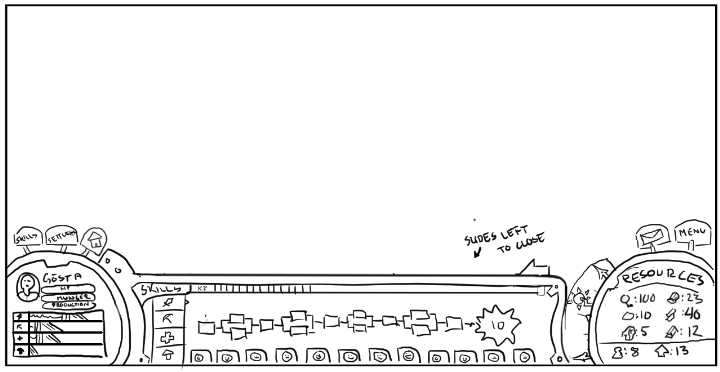
This is the UI screen I’ve worked on the first week. To the left is a small circular display that shows any selected settlers portrait, stats and levels. Above that is a selection of buttons that allow the player to access deeper controls regarding some of the games main mechanics, those being the skill system, a menu outlining all settlers stats and a construction menu. In the middle of the screen is a menu that slides out as the player selects one of those button explained above. It displays these deeper controls and give the player an overlay of settler skills, all settlers stats or an overview of all buildings available. Allowing them to micro-manage their game. To the left is another circular display that shows the player general info about the settlement, like resources, total amount of settlers and buildings. It also shows the player if it’s day or night as well as how much is left of the day or night. Above those are a couple of buttons allowing the player access to a notifications menu or access to the games pause menu.
This is the first part of a skill tree for the game, the chart is made in draw.io and the tree outlines the four main skills a settler can get better at, those being Combat (Red), Gathering (Blue), Healing (Green), Construction (Grey). The way that this works is that a settler that engages in a task related to one of these trees gain experience in that tree. Every other level the player can chose between two differing choices. These two often mark different paths a settler can take in a tree, in combat for example there’s ranged and melee combat focus. At level ten a settler can choose a mastery, that is a secondary tree that relates to one of the four main ones.
From level 11 to 15 a settler will gain improved boosts to a mastery of their choice, knowing that the picture above isn’t the greatest I will post a second picture later on. They have the same colors as the first four and they relate to the same color. The two top trees here are red and does therefore relate to the combat tree in the previous picture. A settler will need to have maxed the combat tree in order to choose any of the two red tree here.
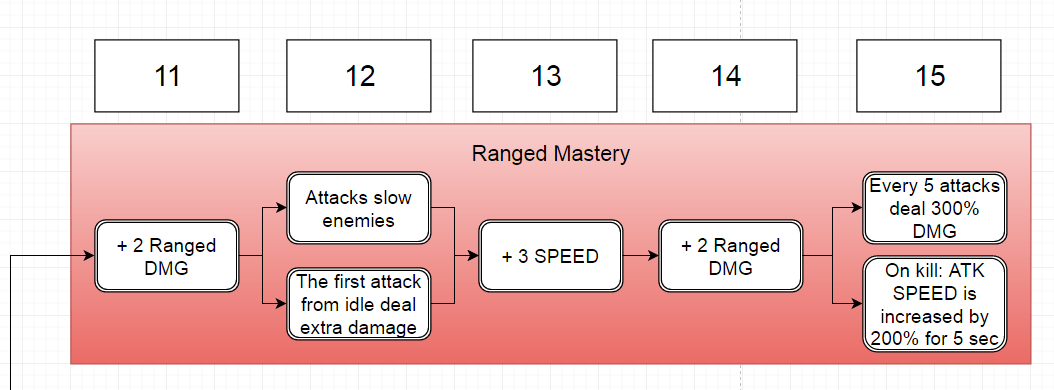
Here’s a closeup of the Ranged Mastery branch, once a settler has maxed out the combat tree they can choose this mastery. It features heavier boost to ranged damage as well as some unique effects that also supports their ranged role. The same goes for every other mastery, they feature better boosts for the chosen branch. The last chunk of work done for week one, was a substantial amount of design document writing. Defining how all the different aspects of the game works.  |