[5SD033] Wave System
|
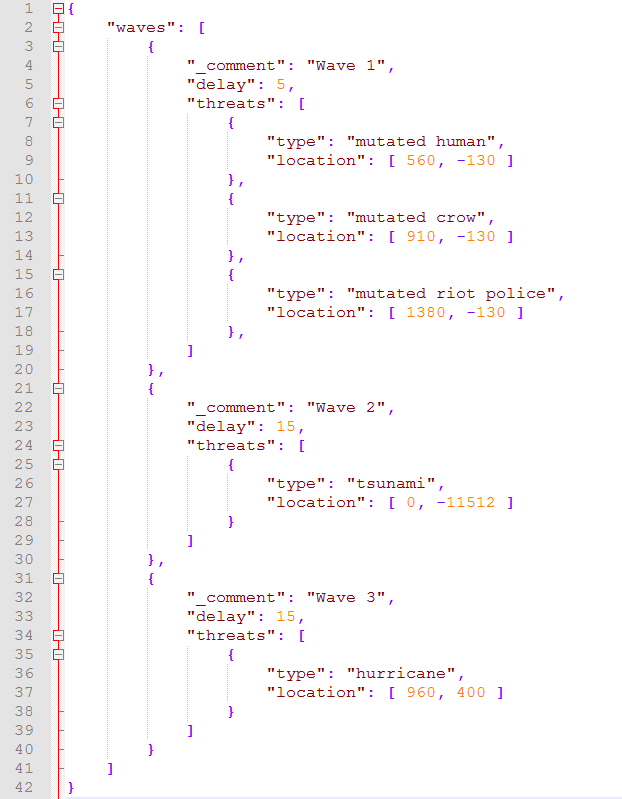
Hello! This week I have mainly been fixing bugs, some refactoring of the code and finished features we needed to have done before our Beta milestone we had last Monday. Except all of this I have also implemented a new system, the Wave System. This new features replaced our hardcoded system we used before, instead of spawning enemies from a update loop we can now to this from a json file. In this post I will try to explain how this works, step by step. Starting by the lower level code and move towards the json file we currently are using. What I first had to decide was what we wanted to able to spawn in a wave, I came to the conclusion we needed enemies and natural disasters to start with. After that I thought about other properties you need per wave, I narrow that down to 1) some kind of delay between one wave to another, 2) a list with all of the threats (enemies and natural disasters in this case) and last 3) the location a threat should spawn on (each threat has it’s own variable). After that I knew how I wanted to lay it out, so I made three new datatypes, 1) struct ThreatInfo, 2) struct WaveInfo and 3) class WaveManager. ThreatInfo is where all of the data per threat will be stored, this is used since I don’t want to create the threats immediately. WaveInfo contains a list with threats and the delay to wait until proceeding to next wave. And lastly the WaveManager is where all of this data is processed. It’s responsible to create all threats per wave, in order to do this it calls methods in the EnemyManager, it also has a list with all of the threats to loop thru. When it has reached to the last wave, it will start over again at index zero. Since it would be a lot of code to define all of waves and threats in the code I decided to move this to a non-compiled file. This way our artists also could make waves and try it out. So I decided to use the json text format, mostly because I didn’t want to use my own syntax or anything too custom. Here is one example how it could look like. To parse the json file, I decided to use a library called RapidJSON. I would really recommend this library since it makes your life so much easier instead of writing your own parser. What I basically did after parsing this file is to convert the types from a string into an enum value. And the location array into a sf::Vector2f.  |