|
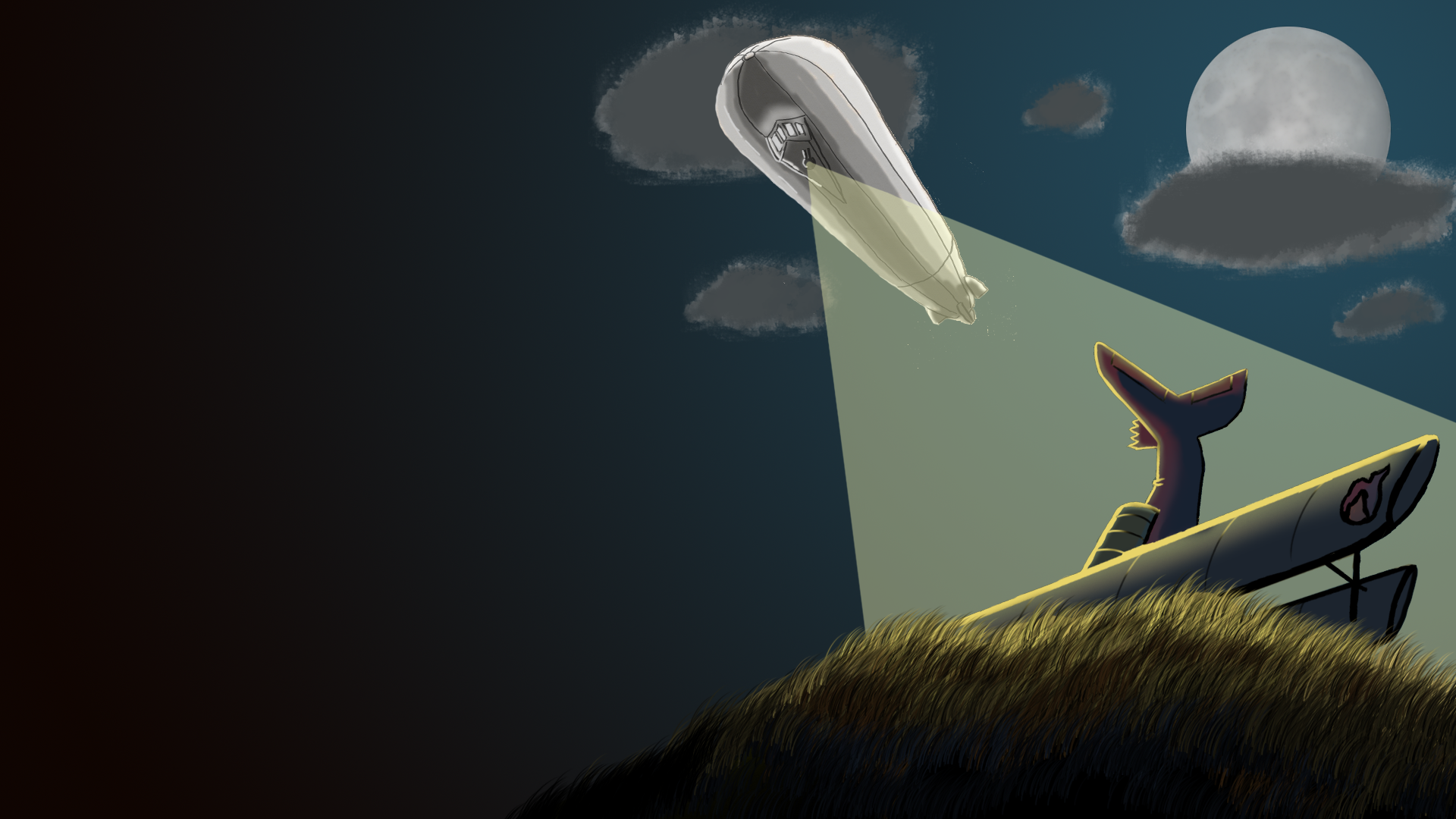
This week I have been tasked with making the visuals for the ‘game over’ screen. The ‘game over’ screen is the screen that appears when the player loses the game in any way, it is not the screen that appears when the player has won the game. It is a screen that will tell the player that she has lost and that her options are to go back to main menu, quit, or to restart. When the player dies in our game, the plane crashes and burns in a fiery way, so I chose to represent this by making the game over screen show us the crash landing. I also knew that since this was a dramatic way of losing, I wanted it to look dramatic as well, so I chose to include the Zeppelin enemy in the picture. The zeppelin shines its bright light directly at the player avatar, this also creates great slanted lines over the canvas which helps the picture with its action and drama.
Now into the details on how I’ve made this.
The plane that is shown in the picture is not made from nothing. I re-used an old art asset of our plane that was the original concpet of our plane. I drew clean lines over it and bent the tail ,then I copied the clean lines and brought it in to my document. I tiltet the plane and put it behind a grassy gnoll, this saves me alot of work since I do not have to include the propeller or the cockpit in the clean lines and it makes it look like it created a crater.
The shading of the plane is made by creating a color pallette, the one Leo sandberg tought us, where every local color is in the middle and at the top we have our light, light yellow, and at the bottom our shade, dark blue. When I had mixed all the colors I used the magic wand tool in order to select all that I had painted in the local color, then creating a new layer where I applied the light and dark version of the colors and I also painted some of the line art yellow to really make it cool. I am very pleased with the results so far.
The zeppelin is simply our original concept of our zeppelin enemy. I have done nothing to it yet, but maybe it is not needed.
When I made the moon I used the circle marking tool and created a almost white circle by selectng the gradient tool, switching it to circular, and then creating a gradiant that is slightly lighter in the middle and slightly darker around the edges. I then got an image of the real moon from google, chose ‘multiply’ in layer options so that everything that is lighter than the background disappears. This makes it so only the craters of the moon where left. I then put the craters over the white circle and used the blur tool to make it less realistic. I am not sure if it still is to realistic, but I am happy about it anyway.
The grassy gnoll is made by using a grass brush and about six layers. I chose the grass bruss, made it a color that was similar to the light that shined on it and painted one or two lines of that color. Then I made a new layer, made it a bit darker, going towards the dark blue (which is the shadow color of the bright yellow the zeppelin produces) and, again, painting one or two rows of grass. I repeated this until I had a grass gnoll that had highlighted grass at the top and dark grass at the bottom. I am very pleased with the result.
I made the clouds by using a cloud brush and putting down globs of dark paint in the sky. I then locked the layer so I couldn’t paint outside the clouds and I used a light color and went around the edges of the clouds to make it look like there where light coming from behind, which it is.
That was a lot to explain, but it is also a lot of work and different methods used to create this. Note that the left side is left black, this is because that is the place the menu and the buttons will go (which one of our programmers are working on). I would also like to say that this work is not done yet, I will continue next week, maybe redo the clouds, clean-line the zeppelin and / or create a seperate smoke sprite that will make it look like there is smoke coming from the crash.
That is all from me, bye. – Sakarias ‘Rostfritt’ Ståhl
About Sakarias Ståhl
2015 Graphics
|
