Week 3 – Attack Animation
|
This week started by discussing the things we needed for the Beta. After Alpha, I realized that I have to start making the two other enemies for our game as soon as possible. We have three different types of enemies: charger, beamer and shooter. The enemy I had already made was the charger enemy, so now it was time to start working on the shooter. More specifically, start working on the attack animation.
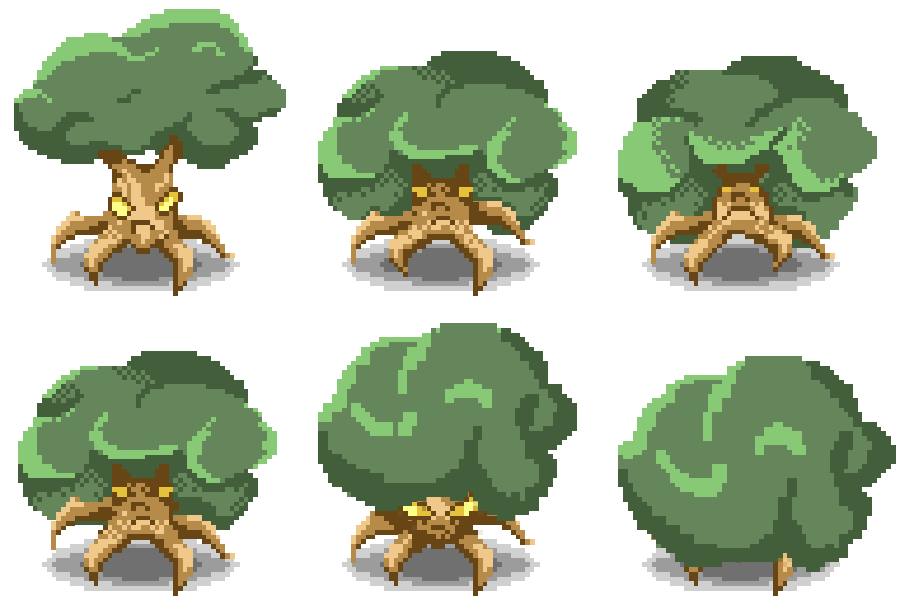
To begin with, I am going to explain a little bit about the appearance of the enemy. First of all, our enemies are supposed to be somehow earth-related because the level they appear on, is the earth part of the four elements of nature. This is why I came up with the idea of creating an ”evil” tree. As weird as it sounds, it actually took a while to decide what would the tree look like, but because our game setting is in Greece, it narrowed down the options massively. So I decided that my source of inspiration would be a Greek olive tree… About the enemy’s legs, I thought it would be cool if the tree’s roots were the legs and it had a spider-like movement. Naturally, our enemies are supposed to look mean and evil so this is why I colored the enemy’s eyes sick yellowish. As for the attack itself, we haven’t exactly figured out yet what the tree actually shoots, but I knew already in the beginning that I wanted to have some movement into the attack, whatever the attack is. I didn’t want a projectile just appearing out of nowhere and without a warning. This is why I decided that the enemy could kind of tilt it’s head back to gather strength and then bolt it forward. It would give the player a clear sign that something is about to happen. Because the movement of the leaves were kind of the center point of the animation, I didn’t want to add any more significant details. Something extra that I did was the front legs which raised towards the sky while the tree’s head was leaning back. This I decided to do because it made the movement more dynamic. And now moving on to the part where I explain how I did everything… First of all, this took a lot more effort than I thought. I was somehow expecting to do this animation as I had done my earlier ones; creating all the frames by moving the limbs one by one either vertically or horizontally. Here I understood that it wasn’t really a possibility because I was supposed to give the player a feeling of dimension. That meant I couldn’t use the enemy’s original layers as a base so I basically had to redraw every single frame, which didn’t turn out being that easy. The only thing that helped my workload even slightly, was the stretch tool in Photoshop. By using that, I could copy the original layer and for example stretch out the leaves part so I didn’t have to do everything all over again. But using that also meant that it needed a lot (and by this I mean lots and lots) of refining. Also, because of the enemy leaning back and forward, I had to redo the shadowing and lighting on every frame in order to give a better perspective to the player. So, this week basically consisted of shadowing and lighting, redoing and refining, and also of course doing the animation itself!  |