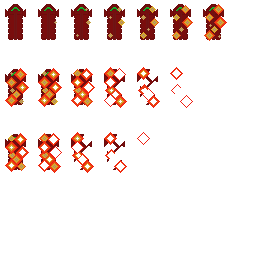
Death Animation – Week 3
|
My name is Victor Kristiansson and I am working with team 6 on Colossus Core, or as we have decided to name it, Desolate Echo. My biggest task this week was to provide the team with an animation for the death of our avatar. I have some experience with animations previously, and since our game is using pixel art the animation process is very basic and simple. The first thing I had to know was what to animate. The avatar is a (relatively speaking) small hovercraft and what is more appropriate to a mechancial device than an explosion? Or rather, a series of explosions. My workflow was very simple, I made an explosion that expands and then evaporates, then simply added one or two explosions in a few frames in rapid succession, creating a larger chain-effect. Every explosion has the same pattern, basically a diamond shape and some explosions overlap others. But before I could do any of that, I had to have a template for the explosion. I sat down with the hovercraft sprite and started to experiment with different stiles. Circular explosions bot large and small. None of them turned out very well so the idea was quickly scrapped. Working in a 32 x 64 resolution can be limiting, so failing the circle I had little choice available when it came to shapes. I tried out a diamond shape and it worked out quite well actually. They sort of locked together nicely, covering large areas of the hovercraft’s hull efficiently. Next task then is to determine the colors. I tried with the red and orange in the center, turning yellowish towards the edges. It looked good, but I didn’t like how it looked upon evaporation. I didn’t hink the yellow worked without the fiery centre very well so I inverted it. I made the absolute centre a bit bright to give some contrast, added a single yellow line around that and then layered orange and a definite red outer edge. This worked much better because the red outer edge looks more ”definitive” than the (in my opinion) hard to see single yellow edge. With the template complete, it was simply a matter of importing it from Krita into the GraphicsGale software for animation. Upon completion the animation consisted of 19 frames, a reasonable amount I think. I then proceeded to use Sprite Packer to create the spritesheet and I am quite happy with the results!  |