The Last Signal. Post #6: AI for enemy type 2
|
This is the last post which is required in the course 5SD033 – Introduction to Game Development. Over the period of about 2 months, our game, “The Last Signal”, has evolved from nothing to almost a playable game – with colourful backgrounds, vivid animations for the player and the enemies, power-ups and a room transition system. The game employs data-driven object creation (rooms, animations and sound effects are created during run-time from data in external text files), some interesting AI and player movement control with the mouse. There are still things to be done to make the game playable:
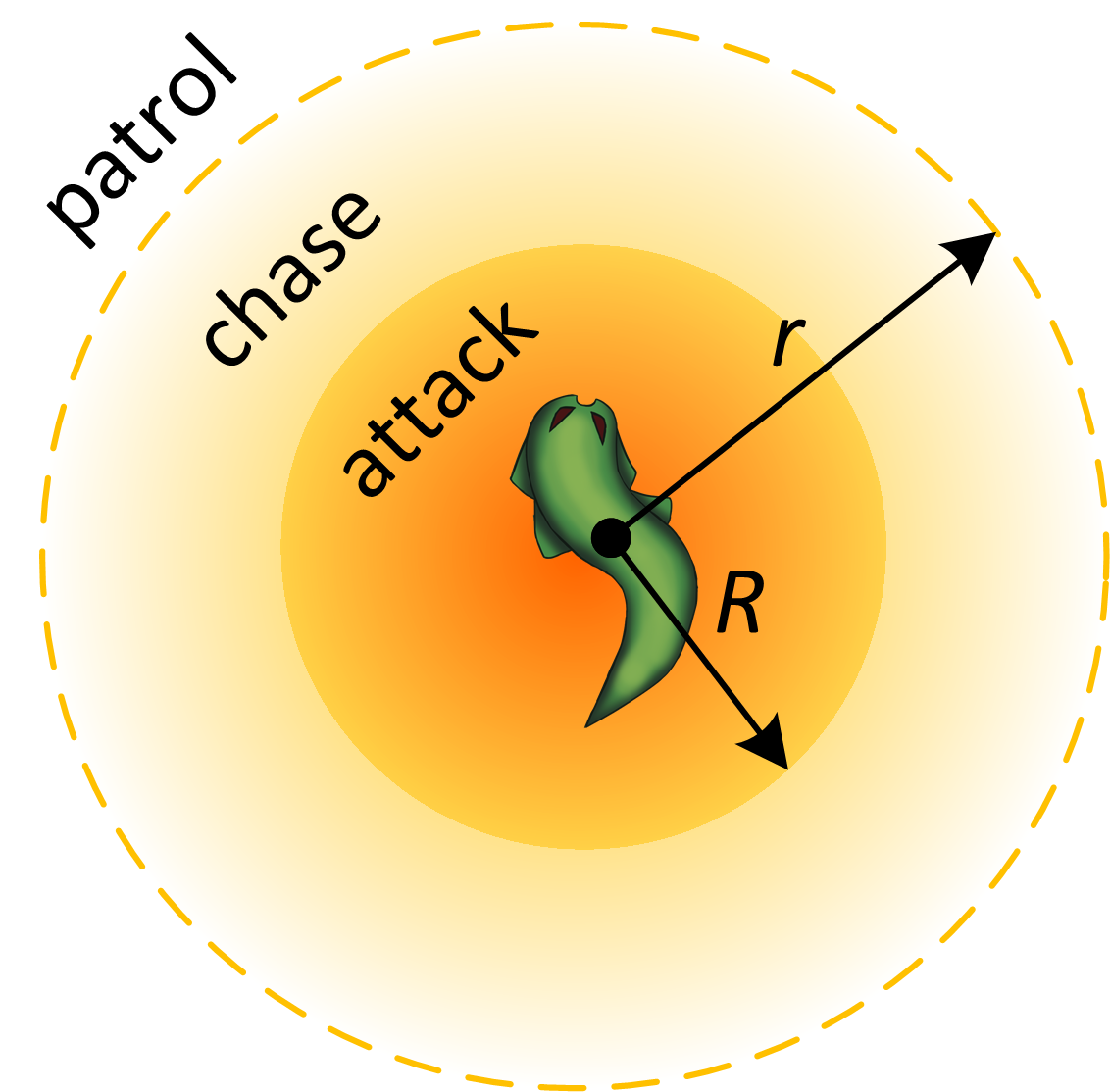
The items above are the absolute minimum that we must add to the game. Many more features have been discussed in the beginning of the project – transparent lighting, different music playing depending on whether the player is under attack or not, particle effects when player projectile hits a wall, to name a few. In the final play session when we will be playing each others’ games, our game will not look much different from what it is now because there simply isn’t enough time to make far-reaching changes to the game. If the time permits, I will continue experimenting with the game code to see how some of the more interesting features (which had to be left out because of unreasonably large project scope) look like in the game. Despite vast differences between what we wanted our final game to be and how it actually turned out, and the difficulties we faced both from technical and team management points of view, the overall experience was enriching on many levels. First of all, I grew noticeably as a programmer because I had to devise solutions to a lot of problems I had never faced before. E.g., binding player movement to mouse movement required to apply concepts from linear algebra in programming; creating sprite and animation managers required “object-oriented” thinking and careful planning. In addition to that, I furthered my team work experience, especially what it is like to work closely in a small team with no hierarchy. Flat hierarchy has its charm but it does not come without a cost. Finally, I got to simply be a part of a process when a full game was created from scratch. This is our first real game since the beginning of the Game Design and Programming studies. Most aspects of real game development were (more or less) there – the planning, the asset creation and the programming. This was very important to me personally. I could even say this third part was the most important to me. I had always wanted to learn those technical principles that make games. What makes otherwise still images move in your screen? How do you tell a projectile to come out at some specific point? How does the mouse pointer track mouse movement on a real-world 2D surface? Now I know … With all that said, we can turn to the last major feature I worked on in this game, AI for enemy type 2. Enemy type 2 AI descriptionI wanted the enemy to have a simple (but well-designed) AI which is based on common behaviour seen in many games: the enemy is doing something else when the player is far away and is attacking when the player is within specific attack range. Checking if the player is within a certain radius from the enemy is very easy. You can simply call a function to evaluate the distance every game frame. Whenever the player gets close enough, the enemy starts attacking (e.g., shooting) and stops attacking when the player leaves the attack area. However, if the enemy does not move and only shoots when the player is within range, the AI will feel very primitive. Just when you cross the boundary of the attack area and start receiving enemy fire, you can move a little backwards to leave the attack area, thus breaking the attack right after it has started. Plus it seems unconvincing that the enemy sees you but does not attack only because you are one step too far away. The natural solution here is to include chasing behaviour so that the enemy will follow you unless you are outside a wider chase area. Here is a diagram which shows how I designed the AI to work:
The enemy AI uses three different behaviour patterns, or states: patrol, chase and attack.
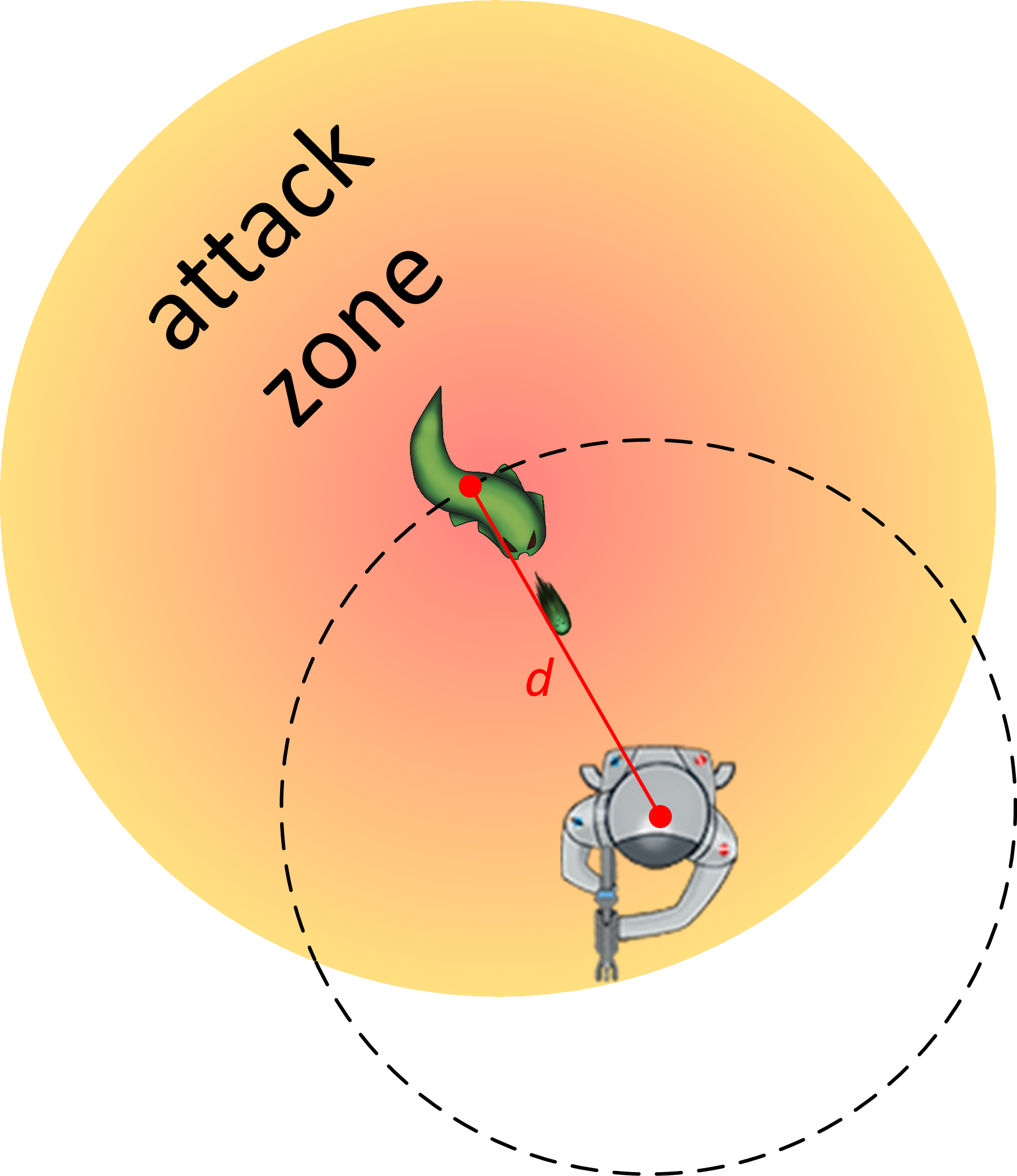
To sum it up, whenever the player is in the chase area, the enemy will keep trying to get close enough to attack (“get” the player inside its attack area) until the player gets outside the chase area. Then the enemy will resume patrolling the map. When attacking, the enemy will position itself at a distance d away from the player and will keep shooting bullets while rotating around the player at the same time:
Notice that attack area rotates together with the enemy so that if the player doesn’t move, he will always stay in the attack area and the enemy will be able to continue shooting until the player is killed. When the player leaves the attack area, the enemy will start chasing the player to bring him back into its attack area and start attacking again. One potential problem here is that it is quite easy to escape the attack area since the player will always be close to the boundary. You can address this issue by making the attack area very large but the bigger part of the area will still never be used as the player will always be close to the boundary. This is more of a theoretical problem – it makes the algorithm feel “unclean” but does not seem to cause any real trouble in the game because you can increase area radius as much as required. So much for the design, let’s move over to the implementation. Implementing the AIMaking enemy follow desired patternsFirst of all, I need to explain how controlling Enemy2’s movement is achieved. In our m_x += m_speed * m_direction.x * deltatime; m_y += m_speed * m_direction.y * deltatime; The first term is enemy speed and determines how fast the enemy moves relative to other moving in-game objects. The familiar deltatime term is a normalization factor which makes visual movement in the game independent of momentary variations in CPU performance. The second term, direction, is a unit-vector that determines which direction the enemy is moving in. It is this term that the AI should manipulate to force the enemy to move in required patterns. Some auxilliary functionsIn the AI implementation code that follows you will see several “helper” functions being called:
class Utilities
{
public:
	static sf::Vector2f GetNormVectorBetweenPoints(float x1, float y1, float x2, float y2);
	static float GetDistance(float x1, float y1, float x2, float y2);
	static int GetRandomNumber(int min, int max);
	static sf::Vector2f RotatePointAboutAnother(sf::Vector2f origin, sf::Vector2f target, float angle);
};
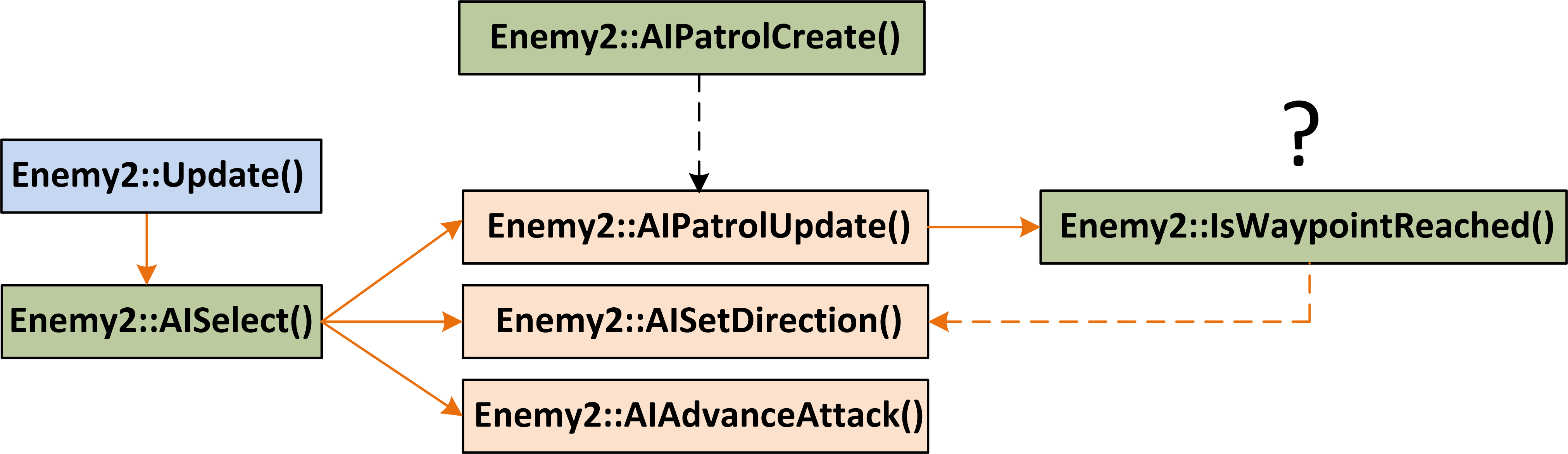
These functions are used to perform mathematical operations which are often needed in the code, such as: to calculate distance between two points; to generate a random number from a specified interval; to get direction vector between two points etc. I decided to add such “helper” functions to a dedicated I will not provide implementation code for these “helper” functions to avoid making this post even longer. It is enough to know what they do, which should be clear from function names. Overview of AI system implementationThe enemy employs three AI modes: “patrol”, “chase” and “attack” which are selected based on the distance between the player and the enemy. The following diagram shows how the AI system is implemented in
Every frame, The Based on the calculated distance The next section explains how the methods are implemented. AISelect()
void Enemy2::AISelect()
{
	float d = Utilities::GetDistance(m_x, m_y, m_player_pos.x, m_player_pos.y);
	if (d >= 225.0f)
	{
		AIPatrolUpdate();
		m_attacking = false;
	}
	else if (d >= 175.0f)
	{
		AISetDirection(m_player_pos);
		m_attacking = false;
	}
	else
	{
		m_attacking = true;
		AIAdvanceAttack(d);
	}
}
This method simply calculates the distance between the player and the enemy and compares it to preset values which define attack, chase and patrol radii. Appropriate “orange” method is called. Notice that this method also keeps track of the member variable AISetDirection()
void Enemy2::AISetDirection(sf::Vector2f target)
{
	sf::Vector2f target_direction = Utilities::GetNormVectorBetweenPoints(m_x, m_y, target.x, target.y);
	m_direction = target_direction;
	m_angle = Utilities::GetAngleBetweenVectors(0, 1, m_direction.x, m_direction.y);
}
This method sets AIPatrolUpdate()
void Enemy2::AIPatrolUpdate()
{
	if (IsWaypointReached())
		m_target_no == m_targets.size() - 1 ? m_target_no = 0 : m_target_no++;
	AISetDirection(m_targets.at(m_target_no));
}
This method first checks if the “current” waypoint (the one the enemy is heading for) has been reached by calling How does
bool Enemy2::IsWaypointReached()
{
	sf::Vector2f current_target = m_targets.at(m_target_no);
	float d = Utilities::GetDistance(m_x, m_y, current_target.x, current_target.y);
	return d <= 5.0f;
}
The method calculates the distance d between enemy position Why do I say that the enemy has reached its target when it is located within 5.0 or fewer units to the target (distance d smaller than or equal to 5.0f)? Why not wait until the enemy hits the target point (i.e., The number of the “current” waypoint in the path is stored in In the same way, when Where does the
void Enemy2::AIPatrolCreate()
{
	for (int i = 0; i  0 && m_targets.at(i) == m_targets.at(i - 1))
		{
			i--;
			continue;
		}
	}
	AISetDirection(m_targets.at(m_target_no));
}
Our current room system (implemented by another programmer) builds rooms from individual tiles and allows you to refer to each tile. There is a method called The In line 6, we check if a randomly chosen tile is the same as the previously chosen tile. If it is, we repeat the iteration to try to choose a different tile. This function only needs to be run once since we won’t need another path for the same enemy unit; it can therefore be called in the constructor. AIAdvanceAttack()
void Enemy2::AIAdvanceAttack(float d)
{
	//rotate (m_x;m_y) about player's (x;y) and set facing angle
	if (d <= 170.0f)
	{
		float extension_factor = 170.0f / d;
		sf::Vector2f temp0 = { m_x, m_y };
		sf::Vector2f temp = Utilities::GetNormVectorBetweenPoints(m_player_pos.x, m_player_pos.y, m_x, m_y);
		temp0 += temp * extension_factor * 0.25f;
		m_x = temp0.x;
		m_y = temp0.y;
		m_angle = Utilities::GetAngleBetweenVectors(0, 1, temp.x, temp.y);
		m_angle -= 180.0f;
		return;
	}

	sf::Vector2f rotated = Utilities::RotatePointAboutAnother(m_player_pos, { m_x, m_y }, 0.000025);
	m_x = rotated.x;
	m_y = rotated.y;

	sf::Vector2f temp = Utilities::GetNormVectorBetweenPoints(m_player_pos.x, m_player_pos.y, m_x, m_y);
	m_angle = Utilities::GetAngleBetweenVectors(0, 1, temp.x, temp.y);
	m_angle -= 180.0f;
}
Like mentioned before, this method enforces enemy’s rotary motion about the player. It does these things:
This method calls several mathematical “helper” functions which I mentioned previously. There is some linear algebra involved here. To avoid making this long post even longer, I will leave the ins and outs of what’s exactly happening in this function to another post. Other than that, the whole AI system has been thoroughly described. Thank you for the patience reading this post and I hope it helped you to understand how the AI for enemy type 2 works.  |
 every game frame: