Typing with sfml
|
The game Magic Writer , as the name might suggest centers on writing. So the game could use at least a function for typing words. In magic writer the player can choose between three words to write. Each letter in the word that you enter in the correct order will be changed to a different colour so one can keep track of which letter have already been written and which ones are left. When a word is finished the embodiment of the word magically appears in the main characters (wizard) outstretched hands and the player can choose to throw them at monsters in the water. If successfully hitting the monster it will be neutralized. So researching about http://www.sfml-dev.org/index.php (Simple and Fast Media Library), which is a tool we use in visual studio to create the game, finding out about the Text class and how to show it in the game window. The text needs a font to work so one needs to be acquired for it to work. Unfortunately a text seems to only be able to have one colour, so you can not have the letters in one word in different colours. I have worked with this artefact or feature and managed to get it to work. First of I made a simple version to the game prototype, were all of the code for typing where written in the gamestate update function, which is quite far from optimal but gives me an easy and simple way to test it and get an overview. Beginning with finding a font, took one from a previous project called gamer.ttf. Then creating the first text and in its function setfont enter the font and just giving it a string(a collection of characters, in this case from the ascii table). Then in gamestate draw trying to draw the text, trying since the draw function in drawmanager (class that handles game window, drawing, clearing and displaying things on it) did not have a function that takes a text as a parameter, so I overloaded the draw function which took an sf::Sprite* as parameter and made this take an sf::Text instead. So now the draw function should work for text and does. Ah there is a text on the screen, now there a just a couple of steps left, like having more than on word, changing word, taking the input from player and comparing it to the words, making the letters change colour. So next step creating an sf::Text array with three elements, two integer variables one to keep track of which word and one for the position in that word. What we need is if (letter entered and character is not holding anything) if (check if letter is equal to the position in the text) if(position equals the size of the texts string (the end of the word)) } } Creating the array and giving the texts some words, placing them at the bottom of the screen. Not having a list of words I made strings of three random letters replace each finished word. In the first version the words turn into a different colour as soon as you type the first letter in the word. This would not do in later version but have to be enough for the first prototype. The words changing colour directly when the first letter is entered is a problem when playing. True the player can see which words that is active but not which letter they are on. So if you type wrong and do not notice you have to guess which letter you are on or retype the word. With this in mind I decided to make a whole class to handle typing and with its own function that draws the words. This so the word selected is turned into two words that have different colour. The class also contains a function to enter a new word, so a whole word can be entered from a list when the previous one is done. A function that checks if the word is done and the letter entered corresponds to the letter in text. 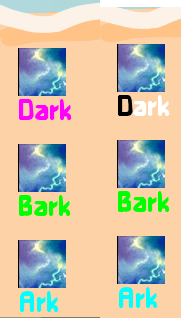
Prototype2 where each letter change colour when typing. 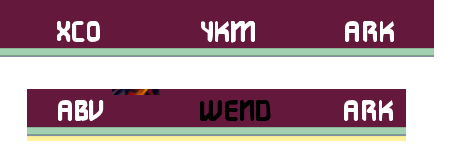
Prototype1 where the whole word change colour
Typing class:  |

