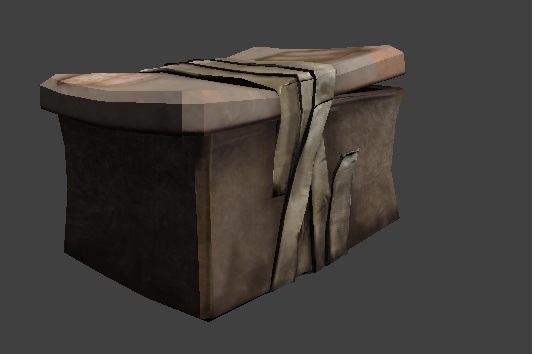
Post Apocalyptic Crate, Final Version
|
I am finally done with my crate! It now has both a normal and specular texture, and of course the diffuse. The diffuse is just the basic texture, where you have the image that is wrapped around the model to make it look like whatever it is supposed to look like. The normal map is the texture that actually adds texture to the object, the kind of texture you talk about when painting a wall. It creates the illusion of having a more detailed model, without actually increasing the number of polygons. The specular map is used to indicate how “shiny” different parts of the model are, that is, how much light they should reflect. It is like the ink coat when painting Warhammer figures. It is very important in order for the player to be able to identify what material the models different components are made of. It was especially important in my case, since my steel box almost looked like cardboard at places, with just the diffuse. However, this was solved by giving it a metal shine using the specular map.
When creating the diffuse, it is important to keep in mind that you will actually have the normal and diffuse on top of that later, as well as shadows. You will have to tell yourself that “It will look great later” and resist the urge to shade and add gloss to the texture. Since the only previous experience I have in 3D is nondigital, I find this really difficult getting used to. It is important to think about how you intend to use the normal map before you actually start making it. Where do you actually need it, and where should you absolutely not use it. For instance, you must keep in mind that the normal map will not make things actually stick out of the model, so making things look protruding, the surface might look weird if seen from the side. When making the specular map, there is one thing that I find a little tricky to wrap my head around, and that is the fact that higher areas on the object are not actually shinier. When making the normal map, it is pretty straight forward, the brighter parts are the ones that will stand out more, it feels quite natural since parts standing out will catch more light and look brighter in real life too. However, when making the specular, you will have to try and forget this.
When deciding what should be modeled and what goes in the normal map, you will have to think about what you will see of them. The model’s primary purpose is to communicate the silhouette. If you try and use the normal map on the silhouette, you will end up breaking the illusion. However, on surfaces that have geometry that does not add to the silhouette, like a relief or any smaller detail, it would be a waste of polygons (and time) to model it.
The Duct tape on my crate could have been sticking tighter to the crate and been done using the normal map, but I wanted the tape to break the silhouette, so I modeled it instead.    |