|
In this post, I will put all of my focus on items and how they are used in the game.
Since we are creating a top down stealth game we do need some items to make the game play more dynamic. It is no fun just to sneak/sprint trough the map and dodging the guards. With items, you can affect how the guard interacts with you and how they interact overall. One item is also needed to finish the level.
1. Weapons
What are it used for?
Weapons is used only for killing guards. We tried to design the game so that the player choose to use other items before using any weapons, because it is a stealth game. The only weapons that are avaible in the game is a gun and a rifle.
Where will it be spawned?
Weapons can be spawned anywhere on the floor. Weapons can also be dropped of a guard that dies. The level is designed to that rare weapons are found in special places in the map. It is like high risk and high to get that item instead of finish the level.
When do we want to the player to use the item?
Although weapon is the only lethal item, we needed the player to visualize it as a last option item.
How does it work?
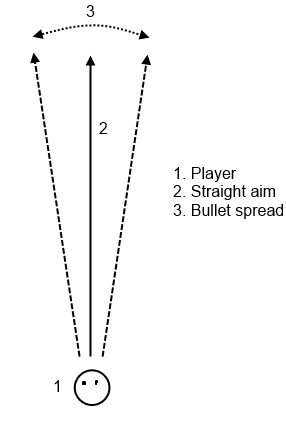
If you have a weapon inside of your inventory and have it selected, you can use LMB (left mouse button) to shoot with it. A weapon has limited amount. If you try to shoot while the magazine is empty, you will hear a click sound, indicating that the magazine is empty. When firing of a bullet, every weapon has a special property called bullet spread, which gives you a slightly worse aim, a bullet spread. Check the image for a visual explanation.
 Every weapon also has a property called fire rate. It’s value is represented in milliseconds and that is how many milliseconds it has to go between every shot.
There is also a Boolean property called auto fire which pretty much explains itself. If it is true, the player can hold down LMB to fire. If it is false, the player has to release the mouse button and press again to fire.
Every weapon does also have a property called damage. This is presented as an integer (1,2,3,4,5). It tells how much damage you take from a bullet that is fired from that weapon.
There is one last property that we not have implemented called weight. When equipped, that weapon should slow the players movement speed. But that is not implemented.
Whenever a shot is fired from the weapon, a sound ripple will be created around the player, alerting guards. This gives you even one more reason not to use a weapon that often.
2. Coins
What are it used for?
Coins are used for tricking guards. You can change their movement behavior using coins.
Where will it be spawned?
Coins can only be spawned on the floor. We placed them strategically outside a soda/candy machine simply because it follow the logic rules, to some limit. We placed some of them anywhere where we thought that you needed to use coins, but the map is not overfilled with it.
When do we want to the player to use the item?
Coins are intended to be used in stealth/sneak mode. If a guard constantly is blocking the player from walking anywhere, a coin can be a really neat dodge towards the guards. We do not see coins like a an overpowered item that has to be limited, instead we see them as a must have item, because they are a part of our core mechanic. That is also why we have many coins spawned.
How does it work?
Whenever you have a coin in your inventory, and have it selected, you can press LMB to throw the coin.
It is much like a weapon fires a bullet, but the coins speed is pretty slow. You have to prepare where to throw the coin and how and assume that the coin will alert the guard from where you intended to.
Coins can not be thrown trough obstacles. When a coin lands after being thrown, the coin will emit a sound. This sound is kinda special because whenever a guard hears a sound emitted from a coin, the guard will go into the investigating state. You can read more about the guards in an another blog post.
This will disrupt the guards walk path and hopefully, you can run past him.
A coin can be picked up again. They will never be removed.
3. Disguises
What are it used for?
It is pretty self explainable. A disguise visual representation is a guards hat. They are used to easily get past a guard.
Where will it be spawned?
Disguises will be spawned later back in the map. This is done for several reasons.
A disguise is a hard item to master because you have to know where you should use it. So that is why we want to introduce other things before that.
We does not want to the player to be taken by surprise of multiple items at once.
Disguises are spawned in locker rooms and those locker rooms are located in the ending part of our map.
When do we want to the player to use the item?
If there is a path that is nearly impossible for a player to get trough, like a narrow hallway or an area with multiple guards, the player should want to use a disguise. Also, when the player is trapped, she might want to use it.
How does it work?
If you have a disguise in the inventory and if it is selected, you can press LMB to use it.
The visual feedback that we present to the player when using a disguise is that she will wear a guards’ hat, making her look like a guard.
When a disguise is active(worn), all guards and cameras wont be able to see/hear her. Well, they will be, but they do not know that she is the one they are looking for. After 3 seconds has gone, the active disguise is removed from the game.
4. Keycards
What are it used for?
To finish the level, one must obtain a keycard.
Where will it be spawned?
Each level must have at least one keycard. The keycard will be the hardest item to obtain. It will be spawned at the end of a narrow passage, guarded by one guard. This is a perfect place for using a disguise.
When do we want to the player to use the item?
At the end of the map.
How does it work?
Whenever the player has obtained a keycard, she have to get to the end of the map which is visually represented by small exit signs on the walls. Whenever the player is at the end, she have to click LMB to use it and finish the level.
This is how all our items look like. Ignore the orange border. This is just visual feedback indicating whenever an item can be picked up.
 |
| Coin |
 |
| Disguise |
 |
| Keycard |
 |
| Weapon, rifle (AK5C) |
 |
| Weapon, gun (G17) |
As for balancing everything, Oskar, our lead designer has made a great job tuning every property and aspect of our items. Go check his blog. http://perkulatorn.wordpress.com/
What do you think of this? Is the description of every item good? Do you understand why the item is there?
The implementation
Finally, anything that makes sense ;).
We have an item manager class that holds every item. The items are created outside the item manager and are then inserted.
Every item inherits from an abstract class called Item. This is done for mainly two reasons.
- I decided that the use of polymorphic managing methods would be great for this. Since every item has a special type, we can from an item, cast it into the wanted type(Weapon, Disguise etc.) without using special cases for every item.
- All items has some properties that are shared. Examples are: sprite, HUD icon and type.
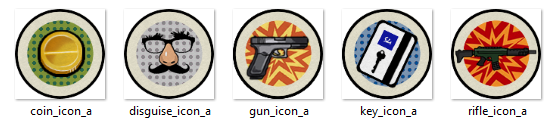
Every item will be visually seen by a icon in the HUD. Every item has two icons. One for not selected and one for selected. Below are icons that is selected.
Every item will also have a sprite called ground_sprite. That is the visual in-game presentation of the item.
Some of the items has a sprite called wear_sprite. This is used by the weapons and can be seen when you wear a weapon.
And every item does also have a type. We choose the type from an enumeration list.
- ITEM_COIN
- ITEM_WEAPON
- ITEM_DISGUISE
- ITEM_KEYCARD
The player has two pointers to Item.
- m_primaryItem
- m_secondaryItem
Whenever we need to swap items, like when you scroll, we only perform a swap on those two pointers.
std::swap(m_primaryItem, m_secondaryItem);
Whenever you throw an item, the m_primaryItem will be set to nullptr and then a swap is performed on the pointers.
That was everything I had to say about items.
Next week
The next week is the very last week of the project. I think we can make it. But I am afraid that the last two days, there will be much pressure on me finished every little detail. The last days of a project is the days I hate most. Hopefully, I manage to finish things this weekend.
Currently I am working on the options GUI where you can change options like Audio, Graphics and Controls. I have told David to create a slider that we will use for controlling the volume. I will be creating lots of toggles like mute and fullscreen etc.
Thank you for reading.
Anthon
About Anthon Fredriksson
2013 Programming
|