10 Week Project – Post 4 – Run Forrest!
|
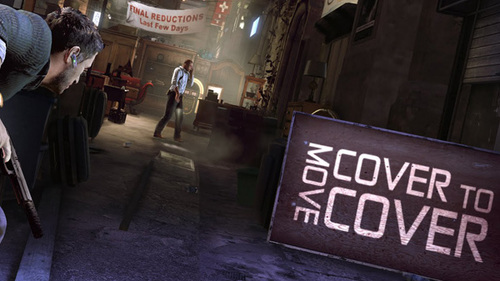
Last time I wrote about how to introduce walking and the challenges with that and now it’s time for the mechanic introduction I have been dreading: Sprinting. As I keep on mentioning in my posts is that we want a minimal HUD and as little pop-ups of information as possible and the reasoning behind that is to distract the player as little as possible and give the player a feeling as they have figured it all out be themselves. But I now realize why a lot of game devs feature these humongous HUDs and are not shy of telling the player exactly what to do. It would be so much easier! But hey, we all love a challenge. So, we introduced walking and general movement by assuming some experience in the player and we also gave the player some time to figure out the controls without any stress of oncoming dangers. You are able to move in most games and the keys for moving is often W, A, S, D. But a sprinting feature is not always implemented into a game, so we might not be able to assume that the player will try to sprint. So how can we introduce a mechanic that might be essential and that not everyone will realize is there, without any direct pop-ups of information like: “Press Shift to Sprint”? To print the information on the screen is not an option since it breaks our aesthetic goal and it might be troublesome since the player can re-bind the keys. Everything in the tutorial level is designed to introduce new features, with little threats and a lot of time. So one way of introducing, or rather, letting the player realize that the sprint function exists is to add some empty space between every challenge. This space, if no threats are near, will give the player a chance to play around and see what every key does (We assume that the player hasn’t and won’t look at the controls menu). If we do this, it is probably a smart thing to bind sprint to the Shift key by default, since it is one of the most common keys for performing this action. This is also similar to how we introduced walking, which might remind the player of that previous experience. But is this enough? With that method, we are still assuming some experience of the players and that they will explore the keyboard to find more mechanics. So maybe we need to add something more? I have previously mentioned Splinter Cell: Conviction and their diegetic HUD and approach of introducing mechanics and objectives to the player. I want to refrain from using any text in the game, but it might be necessary. So maybe we can print some small clue within the game environment? Maybe something like this: This “Run Across” text blends nicely into the floor but is still visible to the player. We have also made this introduction into a challenge. The player has to traverse across this hallway which is quite wide and the player is now accustomed to the regular movement speed of the avatar, so the player should see this hallway and realize that it probably will take 1-2 seconds to cross. So why would you need to sprint across it? Well, there are two guards positioned outside of the room with their flashlight pointing towards the gap and if you just walk across here, they will detect you. Hopefully, the player will have realized what the mechanic does and what key to press before venturing across this hallway. If they haven’t, it will be a bit of a trial and error, but I feel as if we have given the player enough opportunities and incentives to play with the controls. One of the biggest pieces of feedback we got was to add a sprinting mechanic, so we’ll have to wait for the Beta play testing and see if the players figure this one out. |