Project Aurora, post 6, (Blog Assignment 3) Light / Fog of war around the player
|
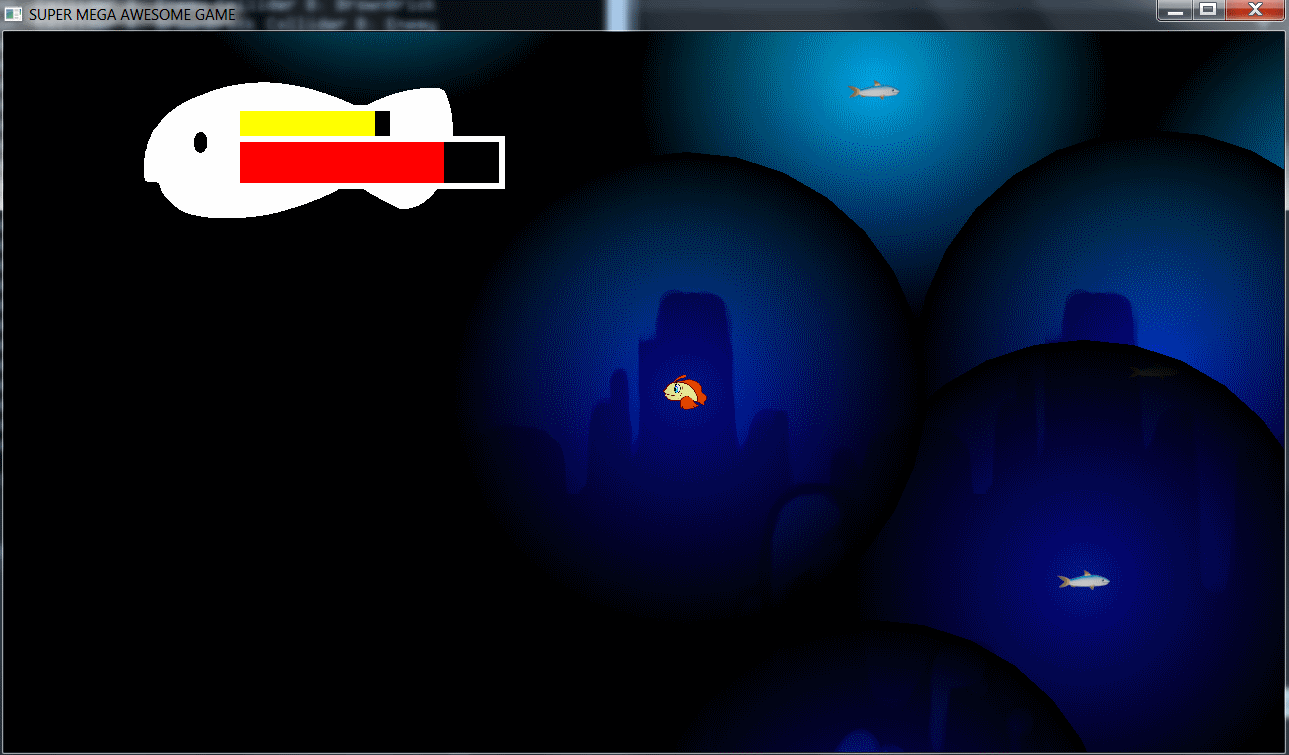
So the feature I have been working on this week is the light effect for our light bulb/Fishing rod that light up an area around the player. This was something I never done before so first I broke down the problem to the basics. So I draw out the filter as a sprite that covers the whole screen, Done! He used something called sf::RenderTexture. With it you can “draw” stuff without showing it on the screen. like a secret drawing. If you give that drawn stuff to a sprite you can then draw the sprite out on screen using our normal DrawManager.. So first I need a circle that will be the ring of light that cuts through the darkness. I then draw this layered circle on to the drawing / sf::RenderTexture that holds the black filter. After that the black filter sprite gets that sf::RenderTexture/secret drawing loaded into it and is then drawn out on the window. GetFilterTexture()->clear(); In this code example I clear my secret drawing. draw out my layered circle and the “save” that.
This feature was easy enough to understand but I bumped into so many problems adapting this code into our game due to much code we have is hard coded with numeric limits. And with that there was a problem when moving around on the screen because the world limits was hard coded this way and so was some starting positions and sizes of the player and whatnot. The black filter was the easiest to add to the game but the hardest to understand( because of how the camera is handled). The black filter can be made really big to cover the whole world or just follow the camera. I chose the solution making it big as the screen and follow the camera because that’s more dynamic and can be used if the game world is made bigger or smaller. With my solution we don’t have to resize the filter all the time. It does that automatic after the screen resolution. |