Playground Panic #1 – Player movement
|
Since we’re doing a top-down shooter, we wanted 8 different directions to walk in that we used the different combinations of WASD for. We also had to make the player rotate depending on where the mouse were on the screen. SFML does this a lot easier than when we worked with SDL, especially on the input-side. We went from having a full input-class to one line basically and if we ever need more control than that we can change it pretty easily.
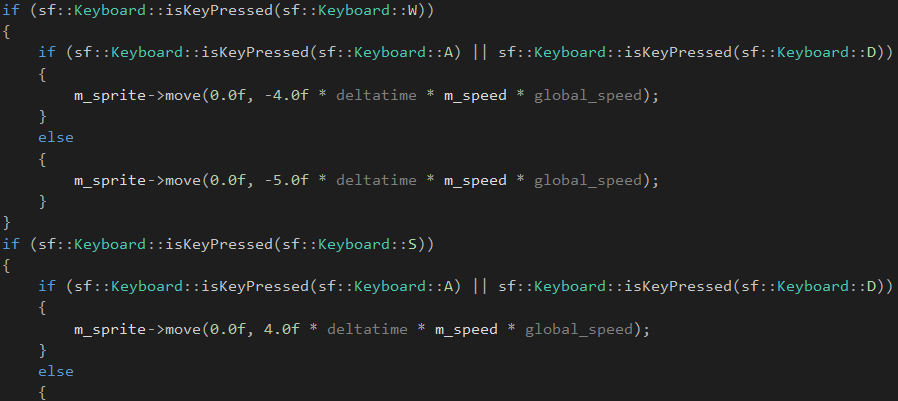
The actual movement is pretty straight to the point using the built in .move of SFML. Diagonal movement did feel slightly too fast when we tested it, so I made a somewhat simple solution and just checked if one of the other two keys were also pressed at the same time and lowered the speed accordingly. Not the most dynamic system, but it can stay for now since we probably won’t have to edit it until we start play-testing more heavily. If I remade it I would go for more multiplication and dynamic variables. The global_speed is a multiplier, by the way, which currently is set on 1.0f.
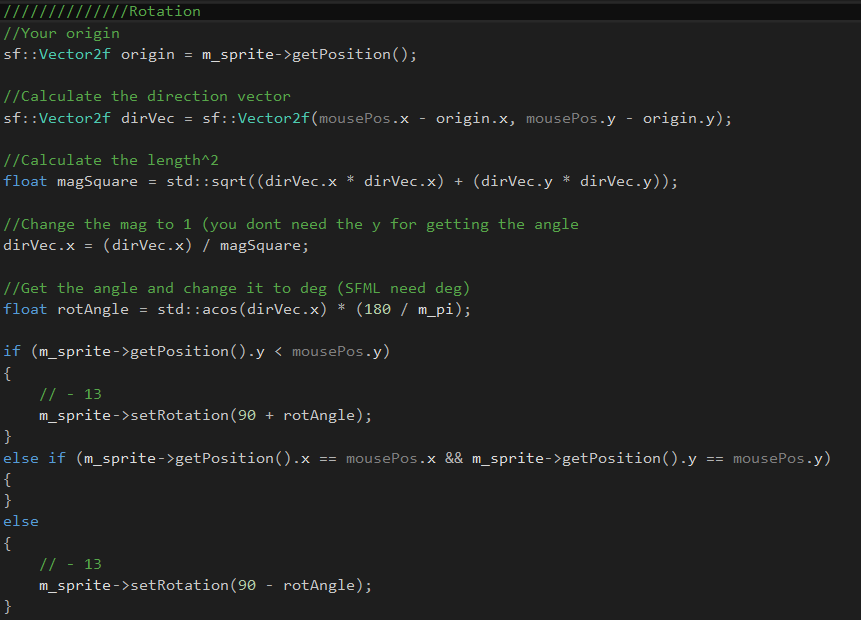
The rotation was a lot trickier, but most of it are stuff we have done before. First we start by getting the direction-vector. Normally skipping .x and .y would have been better, but mouse-position is returned as Vector2i instead of your normal floaty Vector, so this worked interestingly enough without any warnings. After that we get the square root of our directional vectors (the magic square). The parenthesis is mostly there for testing out different ways of changing how the player rotates (which I later messed around with on the projectiles). Then I change the rotation using the built in function (depending on if the mouse is above or below the player) and checks if they are in the same position in which case nothing happens (else the sprite tends to disappear).
And here’s a small demonstration on how it works (ignore the small jump it does at the end, that’s just the recording). The rotation is working really smoothly as of now, but the speed will most likely need some adjustments further down the line when we get enemies, collisions and background blended into the mix. Currently it’s really hard to get a feel for how fast it is really going since there’s nothing to compare it to.
And since I needed 400 words, here’s a bonus gif with a bit more on how it looks (including Camtasia’s laggy version of the shooting-system, it’s normally just a fine line).
|